
Bixolon · Label printers
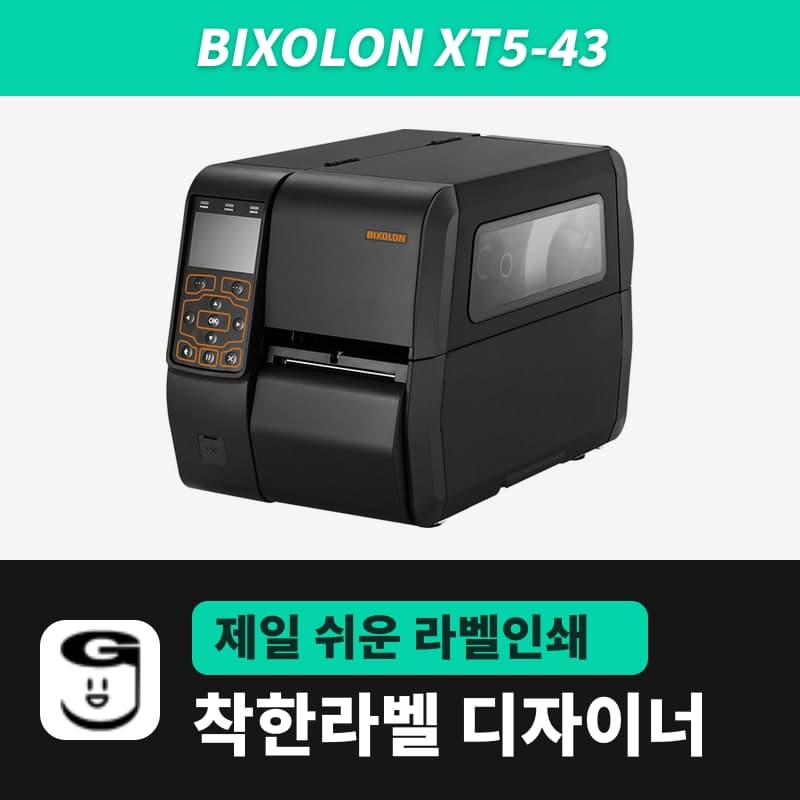
Bixolon XT5-43 label printer
On the XT5-43, peeler, cutter, rewinder and GPIO line integration are set in the printer menu; the print data from GoodLabel Designer's XT5-43 (ZPL, 300dpi) is the same regardless of options. It is Bixolon's XT5-series 300dpi model: max 10ips, 105.7mm print width, 2,500mm labels.
- Print method
- Thermal transfer and direct thermal
- Resolution
- 300dpi (11.8 dots/mm)
- Max print width
- 105.7mm (1,248 dots)
- Max print speed
- 254mm/s (10ips), speed menu 2–10ips (6ips at shipment)
- Max print length
- 2,500mm (30,000 dots)
- Media
- Width 25–114mm, thickness 0.06–0.30mm, outer diameter up to 203mm, core 38.1–76.2mm (1-inch optional)
Specifications
| Print method | Thermal transfer and direct thermal |
|---|---|
| Resolution | 300dpi (11.8 dots/mm) |
| Max print width | 105.7mm (1,248 dots) |
| Max print speed | 254mm/s (10ips), speed menu 2–10ips (6ips at shipment) |
| Max print length | 2,500mm (30,000 dots) |
| Media | Width 25–114mm, thickness 0.06–0.30mm, outer diameter up to 203mm, core 38.1–76.2mm (1-inch optional) |
| Ribbon | Ink side out or in, up to 450m, 1-inch core / width 50–110mm on the spec sheet, 40–110mm in the manual specification table |
| Options | Peeler, auto cutter, external rewinder (203mm outer diameter), 1-inch media core |
| GPIO | DB15, 5/24V, 4 inputs and 8 outputs (in the USB + serial + parallel or GPIO + Ethernet + 2 USB hosts optional configuration) |
| Emulation | SLCS, BPL-Z (ZPL II), BPL-E (EPL), BPL-D (DPL) / menu auto at shipment |
| Sold variants | Connection: USB or RS232 |
| GoodLabel Designer model | XT5-43 (ZPL, 300dpi) |
When you use the XT5-43 with peeler, cutter or rewinder options, or tie it into production line GPIO, all of that operation is set in the printer menu, and the print data GoodLabel Designer sends is the same regardless of options. The printer prints 11.8 dots per mm (300dpi), with a max of 10ips (254mm/s), a 105.7mm print width, and labels up to 2,500mm long.
Peeler, cutter and rewinder options and Designer printing
The Designer's ZPL block opens with ^XA, carries a ^GFB bitmap, and closes with ^XZ. The operation of the three options is chosen with the print mode in the printer's setup menu (Tear Off, Auto Cutter, Rewinder) and the peeler switch.
| Option | Printer setting | When printing multiple labels from the Designer |
|---|---|---|
| Peeler | Peeler switch ON (check that the LED is lit), used with label media only | The printed label must be taken off before the next one comes out, so it stops after each label for the number of copies |
| Auto cutter | Print mode Auto Cutter | Cut according to the printer setting |
| External rewinder (up to 203mm outer diameter) | Print mode Rewinder | The printed roll winds onto the rewinder |
Tying the printer into a production line with GPIO
Among the optional interfaces, the USB + serial + parallel and GPIO + Ethernet + 2 USB hosts configurations include a DB15 GPIO port (5/24V, 4 inputs and 8 outputs). The GPIO port mode in the setup menu has five values, Off and 1–4, and Off, the shipment setting, prints immediately without a start signal.
When the port mode is set to one of 1–4, a print-complete signal is output, and the start signal can be Level (shipment setting, starts when a LOW signal comes in) or Pulse (starts on a change from HIGH to LOW). When test printing from the Designer alone on a printer tied to print on line signals, temporarily set the port mode to Off.
Designer entry and resolution
The XT5-43 in the Designer list is a ZPL, 300dpi entry. Opening a .glb saved for the XT5-40 restores the 203dpi it was saved with, so change to the 300dpi entry in Printer settings, and check the recalculated barcode widths on the first label with a scanner. Sold variants offer a USB or RS232 connection. The driver to install is the Bixolon unified driver in the download center.
Compatible with GoodLabel Designer
You can design and print labels for this model with GoodLabel Designer, our free label software. GoodLabel Designer · User Guide
FAQ
- I sent 20 copies to a peeler model, but labels come out only one at a time.
- When the peeler switch is on, the printed label must be taken off before the next one prints, so 20 copies means taking labels off 20 times. To receive 20 labels in a row without taking them off, turn off the peeler switch; the peeler is used only with label media.
- When should I choose the XT5-43 instead of the XT5-40?
- When you need to print labels with small text and 2D codes at industrial speed. The 300dpi model goes up to 10ips, and the 203dpi XT5-40 goes up to 14ips.
- How does the Designer's Density field differ from the printer's density?
- The Designer's Density field (0–30, default 21) is sent with the ~SD command before the first label of a job, and density in the printer's setup menu is also in the 0–30 range, with 15 at shipment. There is no confirmed record of ~SD taking effect on Bixolon printers, so if printing is faint on thick media, adjust by the density in the printer menu.
Drivers & manuals
How to buy
- In Korea, this product is sold through our Korean online store. Korean product page →
- Outside Korea, contact us by email. Email: Contact →
- Or buy from an authorized dealer in your country.
Other models in this category
 Good LabelGoodLabel 4B-2054NS direct thermal label printerThe GoodLabel 4B-2054NS is a direct thermal only 4-inch printer driven by GoodLabel Designer in TSPL; the Gap length field value goes into the GAP command as is. GoodLabel 4B-2054NS, W-4B-2054NS and Xprinter 4B-2054N in the model list are all TSPL at 203 dpi, so each sends the same commands.
 BixolonBixolon SLP-DX220 label printerThe SLP-DX220 is a Bixolon 2-inch direct thermal printer, 54mm print width, 203dpi, up to 6ips, rolls 15–60mm wide. Select SLP-DX220 (ZPL, 203dpi) in the GoodLabel Designer model list, and the Troubleshoot window skips the print method step and guides only saving the label type and Detect media.
 BixolonBixolon SLP-DX223 label printerA 2-inch direct thermal printer for dense text and QR codes on small labels 10–20mm tall, using the SLP-DX220 body with a head of about 11.8 dots per mm (print width 56.9mm, max 4ips). In the Designer model list it appears under its sales name, SLP-DX223, with a single ZPL, 300dpi setting.
 BixolonBixolon SLP-DX420 label printerThe SLP-DX420 is a Bixolon 4-inch direct thermal only printer, 108mm wide at 203dpi and up to 7ips, suited to printing many thermal labels such as 100×150mm shipping labels. In GoodLabel Designer, select SLP-DX420 (ZPL, 203dpi); copies of the same label go as one ^PQ quantity command.
 BixolonBixolon SLP-DX423 label printerFor the SLP-DX423, you must select the SLP-DX423 (ZPL, 300dpi) entry in GoodLabel Designer; if you send to the 203dpi SLP-DX420 entry, labels come out shrunk to about 68% of their size. The printer is a Bixolon 4-inch direct thermal only model with a 105.7mm print width and a max speed of 5ips.
 BixolonBixolon SLP-TX400 label printerIn the GoodLabel Designer Troubleshoot window, the print method step (thermal transfer or direct thermal) appears only when the Printer model field shows SLP-TX400. It is a Bixolon 4-inch thermal transfer and direct thermal printer (203dpi, 108mm, max 7ips); Designer entry: SLP-TX400 (ZPL, 203dpi).