
Toshiba · Label printers
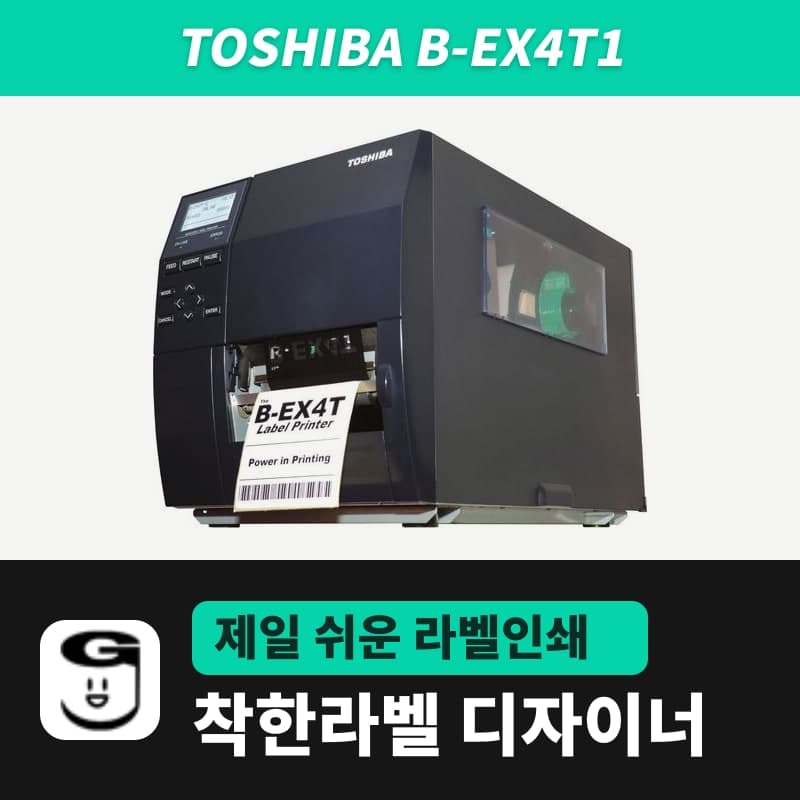
Toshiba B-EX4T1 label printer
The Toshiba B-EX4T1 is a 4-inch industrial printer with a near-edge head: 203dpi (GS) and 305dpi (TS) heads print up to 355.6mm/s; it takes 800m ribbons and 200mm OD rolls on a 76.2mm core. In GoodLabel Designer's B-EX4T1 (TPCL) entry, click 203 (GS) or 300 DPI (TS); print via the Toshiba driver.
- Models
- B-EX4T1-GS (203dpi) / B-EX4T1-TS (305dpi)
- Print method
- Thermal transfer and direct thermal
- Print speed
- GS 76.2-355.6mm/s (3-14ips) / TS 76.2-355.6mm/s
- Max print width
- 104mm
- Media pitch
- 10-1,500mm (batch) (label height in GoodLabel Designer goes up to 1000mm)
- Media width
- Including liner 30-120mm (user manual) / 25-120mm (spec sheet 2012); label width up to 104mm thermal transfer, 117mm direct thermal
Specifications
| Models | B-EX4T1-GS (203dpi) / B-EX4T1-TS (305dpi) |
|---|---|
| Print method | Thermal transfer and direct thermal |
| Print speed | GS 76.2-355.6mm/s (3-14ips) / TS 76.2-355.6mm/s |
| Max print width | 104mm |
| Media pitch | 10-1,500mm (batch) (label height in GoodLabel Designer goes up to 1000mm) |
| Media width | Including liner 30-120mm (user manual) / 25-120mm (spec sheet 2012); label width up to 104mm thermal transfer, 117mm direct thermal |
| Media roll | Core 76.2mm, outer diameter 200mm (180mm with the built-in rewinder), wound inside as standard |
| Gap | 2-20mm (batch), label length to gap ratio 3:1 or more |
| Ribbon | Width 41-112mm, up to 800m, outer diameter up to 90mm, at least 5mm wider than the media |
| Printhead | Near edge; replaceable with separately sold 203dpi and 305dpi heads |
| Interfaces | USB, wired LAN standard |
| GoodLabel Designer model | B-EX4T1 (TPCL, 203/300/600dpi buttons), driver printing |
The Toshiba B-EX4T1 is a 4-inch industrial printer with a near-edge head and a 17kg metal body. It prints up to 355.6mm per second (14ips) and takes 800m ribbons. Sold variants: GS (203dpi) and TS (305dpi). The B-EX4T1 entry (TPCL) in the GoodLabel Designer list has 203, 300 and 600 DPI buttons, so you click the button that matches the head yourself.
DPI buttons for the GS and TS heads
| Variant | Head density | DPI button to click | Dots for the 70x40mm item management template |
|---|---|---|---|
| B-EX4T1-GS | 8 dots/mm (203dpi) | 203 | 560x320 dots |
| B-EX4T1-TS | 12 dots/mm (305dpi) | 300 | 827x473 dots |
The list has no 305 DPI button, so TS is drawn at the closest 300 DPI; the label width and height in mm are passed to the driver as the paper size, so the printed size stays in mm. The separately sold replacement heads are also only 203dpi and 305dpi, so do not click the 600 DPI button. The method shared by Toshiba entries, which passes the image to the driver, is in the first table on the BA420T page.
76.2mm core and inside-wound rolls
- The media core has one inner diameter, 76.2mm, and the roll outer diameter is up to 200mm (180mm with the built-in rewinder).
- The standard winding is a roll with the print side inside.
- The lower limit of media width including liner differs: 30-120mm by the user manual and 25-120mm by the spec sheet (2012). The upper limit of label width is 104mm for thermal transfer and 117mm for direct thermal.
- In batch issue, the gap between labels is 2-20mm, and the ratio of label length to gap must be 3:1 or more.
The media pitch in batch issue is 10-1,500mm, but the designer label Height field stops at 1000mm.
Ribbon width 41-112mm and head type
Ribbons are accepted at widths of 41-112mm, up to 800m long and up to 90mm in outer diameter, and Toshiba's recommended widths are 41, 50, 68, 84 and 112mm. To avoid wrinkles, the ribbon must be at least 5mm wider than the media, and for 120mm wide media use only 112mm ribbon.
| Ribbon width | Matching media width (excluding liner) |
|---|---|
| 41mm | 30-36mm |
| 55mm | 36-50mm |
| 68mm | 50-63mm |
| 84mm | 63-79mm |
| 102mm | 79-97mm |
| 112mm | 97-107mm |
This model uses a near-edge head design, so choose ribbons after checking the head type. GoodLabel ribbon product names do not state the head type, so they are not paired with this model here.
LCD media and ribbon messages
| Message | Cause | Fix |
|---|---|---|
| NO PAPER | Media ran out, media loaded incorrectly, sensor position not adjusted, sensor calibration not matched to the roll, slack media (5 causes) | Fix the cause, then RESTART; for calibration, set the sensor threshold level per the Toshiba key operation specification |
| RIBBON ERROR | Ribbon not winding correctly, ribbon not loaded, ribbon sensor fault | Check or replace the ribbon; for a sensor fault, request repair |
| NO RIBBON | Ribbon ran out | Load a new ribbon and RESTART |
| REWIND FULL | The built-in rewinder is full of liner | Remove the wound liner and RESTART |
PAPER JAM has 6 causes: jammed media, media loaded incorrectly, a sensor selection that does not match the roll, a black mark sensor off the mark, a roll different from the specified size, and sensor calibration not matched to the roll. If it happens right after sending from the designer, first check that the driver Sensor and the designer label width and height match the loaded roll.
Compatible with GoodLabel Designer
You can design and print labels for this model with GoodLabel Designer, our free label software. GoodLabel Designer · User Guide
FAQ
- The TS printer is 305dpi. Is the size correct if I draw at 300 DPI?
- The designer passes the label width and height in mm to the driver as the paper size, so the printed size stays in mm. 300 DPI is the button in the list closest to 305, and only the dot spacing of the image is based on 300dpi.
- Can I load a roll with a 40mm core on the B-EX4T1?
- The B-EX4T1 accepts only one media core, 76.2mm inner diameter, so rolls with a 40mm core are out of spec. Use rolls on a 76.2mm core wound up to 200mm outer diameter.
- Can I set a narrow gap for small labels?
- In batch issue, the gap must be 2mm or more, and the label length must be at least 3 times the gap. For labels with a 3mm gap, the length must be 9mm or more, and the gap is entered in Label Gap on the Stock tab of the Toshiba driver.
Drivers & manuals
How to buy
- In Korea, this product is sold through our Korean online store. Korean product page →
- Outside Korea, contact us by email. Email: Contact →
- Or buy from an authorized dealer in your country.
Other models in this category
 Good LabelGoodLabel 4B-2054NS direct thermal label printerThe GoodLabel 4B-2054NS is a direct thermal only 4-inch printer driven by GoodLabel Designer in TSPL; the Gap length field value goes into the GAP command as is. GoodLabel 4B-2054NS, W-4B-2054NS and Xprinter 4B-2054N in the model list are all TSPL at 203 dpi, so each sends the same commands.
 BixolonBixolon SLP-DX220 label printerThe SLP-DX220 is a Bixolon 2-inch direct thermal printer, 54mm print width, 203dpi, up to 6ips, rolls 15–60mm wide. Select SLP-DX220 (ZPL, 203dpi) in the GoodLabel Designer model list, and the Troubleshoot window skips the print method step and guides only saving the label type and Detect media.
 BixolonBixolon SLP-DX223 label printerA 2-inch direct thermal printer for dense text and QR codes on small labels 10–20mm tall, using the SLP-DX220 body with a head of about 11.8 dots per mm (print width 56.9mm, max 4ips). In the Designer model list it appears under its sales name, SLP-DX223, with a single ZPL, 300dpi setting.
 BixolonBixolon SLP-DX420 label printerThe SLP-DX420 is a Bixolon 4-inch direct thermal only printer, 108mm wide at 203dpi and up to 7ips, suited to printing many thermal labels such as 100×150mm shipping labels. In GoodLabel Designer, select SLP-DX420 (ZPL, 203dpi); copies of the same label go as one ^PQ quantity command.
 BixolonBixolon SLP-DX423 label printerFor the SLP-DX423, you must select the SLP-DX423 (ZPL, 300dpi) entry in GoodLabel Designer; if you send to the 203dpi SLP-DX420 entry, labels come out shrunk to about 68% of their size. The printer is a Bixolon 4-inch direct thermal only model with a 105.7mm print width and a max speed of 5ips.
 BixolonBixolon SLP-TX400 label printerIn the GoodLabel Designer Troubleshoot window, the print method step (thermal transfer or direct thermal) appears only when the Printer model field shows SLP-TX400. It is a Bixolon 4-inch thermal transfer and direct thermal printer (203dpi, 108mm, max 7ips); Designer entry: SLP-TX400 (ZPL, 203dpi).