
Bixolon · Label printers
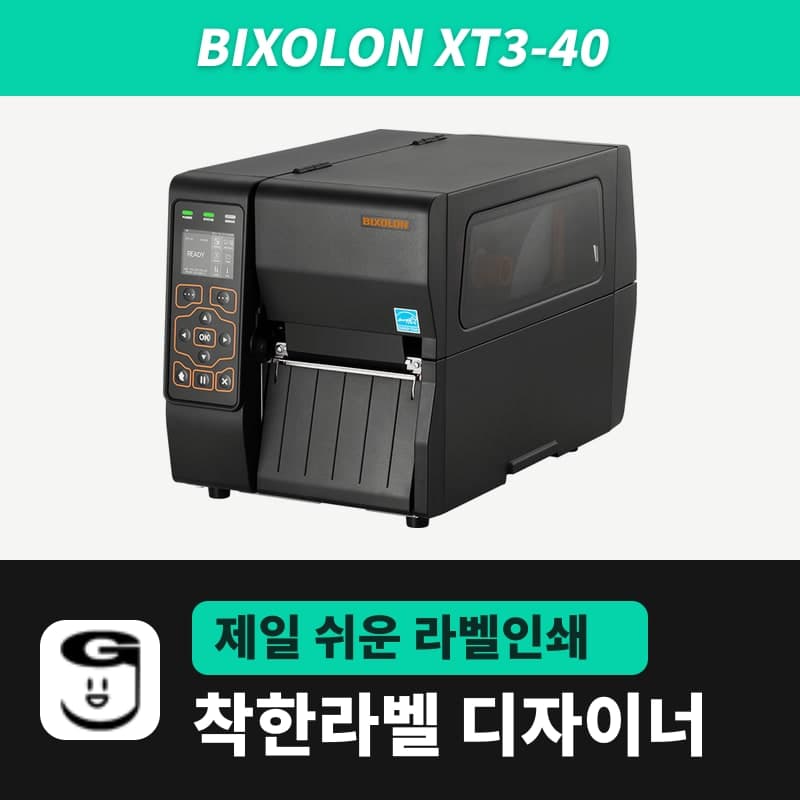
Bixolon XT3-40 label printer
The XT3-40 is a compact Bixolon industrial 4-inch printer for rolls up to 203mm in outer diameter and 450m ribbons (203dpi, 108mm, max 8ips, 2.4-inch color LCD). ZPL from GoodLabel Designer's XT3-40 (ZPL, 203dpi) is the spec sheet's BPL-Z (ZPL II) emulation; the emulation menu ships set to AUTO.
- Print method
- Thermal transfer and direct thermal
- Resolution
- 203dpi (8 dots/mm)
- Max print width
- 108mm (864 dots)
- Max print speed
- 203mm/s (8ips), speed menu 3–8ips (7ips at shipment)
- Max print length
- 4,000mm
- Media
- Width 20–114mm, thickness 0.06–0.25mm, outer diameter up to 203mm, core inner diameter 25.4–76.2mm
Specifications
| Print method | Thermal transfer and direct thermal |
|---|---|
| Resolution | 203dpi (8 dots/mm) |
| Max print width | 108mm (864 dots) |
| Max print speed | 203mm/s (8ips), speed menu 3–8ips (7ips at shipment) |
| Max print length | 4,000mm |
| Media | Width 20–114mm, thickness 0.06–0.25mm, outer diameter up to 203mm, core inner diameter 25.4–76.2mm |
| Ribbon | Ink side out or in, wax, wax/resin, resin, width 40–110mm, up to 450m, 1-inch core only |
| Sensors | Transmissive (adjustable position), reflective (adjustable position), ribbon end, head open / gap sensor sensitivity 10–100 (70 at shipment) |
| Emulation | SLCS, BPL-Z (ZPL II), BPL-E (EPL), BPL-D (DPL, optional) / menu AUTO at shipment (SLCS, BPL-Z, BPL-E) |
| Interfaces | Standard: USB + USB host + serial + Ethernet (10/100Mbps) |
| Display | 2.4-inch color TFT LCD |
| Dimensions and weight | 240×430.5×276.7mm, 9.3kg (11.88kg with the external rewinder) |
| Sold variants | Connection: USB or RS232 |
| GoodLabel Designer model | XT3-40 (ZPL, 203dpi) |
The XT3-40 is the compact 4-inch model in Bixolon's industrial line, and it takes label rolls up to 203mm in outer diameter and 450m ribbons, so rolls are changed less often than on desktop printers. It prints 108mm wide at 203dpi, with a max speed of 8ips (203mm/s), and has a 2.4-inch color LCD on the front.
The emulation menu and the Designer's ZPL
In the GoodLabel Designer model list, the XT3-40 is a ZPL commands, 203dpi entry, and the Designer wraps the bitmap of the drawn label in ZPL commands and sends it. According to the spec sheet, the XT3-40 supports ZPL through BPL-Z (ZPL II) emulation, and the emulation item in the LCD setup menu is AUTO at shipment; in this state it distinguishes SLCS, BPL-Z and BPL-E commands on its own.
The emulation item on the XT3 series has only one selectable value, AUTO, so there is no need to lock it to a specific language. The menu that chooses between auto and BPL-D is on the XT5 series. If the menu is locked when you try to change printer settings, the password (Security) function in the setup menu is turned on.
LCD status messages and next steps
| LCD message | Meaning | Next step |
|---|---|---|
| READY | Ready to print | Print from the Designer |
| STANDBY | Waiting for user input | Clear standby with the button, or feed one label and return to standby |
| PRINTING | Printing | New jobs wait until the current job finishes |
| F/W Downloading | Downloading firmware | Do not turn off the power or send prints until it finishes |
| PAUSE / CANCEL | Paused / printing canceled | Resume the job or resend from the Designer |
| PRINT HEAD OPEN | The head is open | Close the head lever |
| PRINT HEAD OVER TEMP / COLD TEMP | Head reached maximum temperature / minimum temperature | Wait until the head temperature returns to normal, then resend |
| MEDIA OUT | Media not loaded correctly | Check the roll and media path |
| RIBBON OUT | Ribbon not loaded correctly | Check that the ribbon roll is seated correctly on the spindle; to use no ribbon, switch to Direct thermal |
| MEDIA JAM | Media jammed, normal printing not possible | Remove the jammed media and resend |
| SENSING FAIL | Media not recognized correctly | Recalibrate the media following the steps in the Troubleshoot window |
| AUTO CUTTER JAM | Media caught in the cutter blade | Remove the media from the cutter-equipped unit |
The sensor menu on the printer also has gap calibration and black mark calibration, and gap sensor sensitivity is changed in the range 10–100 (70 at shipment). The amount of media fed during calibration varies with the media characteristics.
Ribbon and roll requirements
The printer accepts only ribbons wound on a 1-inch (25.4mm) core, wound with the ink side either out or in, up to 450m long and 40–110mm wide. For 3–4-inch ribbons, push the supply spindle to the UP side (the shipment setting), and for 1–2-inch ribbons to the DOWN side, until it clicks. When using the 300m variant of GoodLabel's wax ribbon, also choose the spindle position to match the ribbon width.
Label rolls must be up to 203mm in outer diameter, with a core inner diameter of 25.4–76.2mm, a media width of 20–114mm and a thickness of 0.06–0.25mm. Sold variants offer a USB or RS232 connection, while the back of the printer has USB, USB host, serial and Ethernet ports from the start.
Compatible with GoodLabel Designer
You can design and print labels for this model with GoodLabel Designer, our free label software. GoodLabel Designer · User Guide
FAQ
- Which is right for me, the XT3-40 or the XT5-40?
- If you print a large volume each day and speed matters, choose the XT5-40 with a max of 14ips; if 8ips is enough and you want a lighter (9.3kg) and smaller printer, choose this model. Both entries are ZPL at 203dpi in the Designer, so label files move over without resolution conversion, but the XT5-40's print width is 104mm, so labels wider than 104mm are cut off at the edge.
- Can it take label rolls with 1.5-inch or 3-inch cores?
- The media core accepts an inner diameter of 25.4–76.2mm (1–3 inches), so rolls with both 1.5-inch and 3-inch cores fit. The roll outer diameter must be 203mm or less.
- What do I change when using thermal media only?
- Remove the ribbon and set the print method in the Designer's Printer settings to Direct thermal, and ^MTD is sent before the first label. If you also choose Direct thermal (no ribbon) as the print method in the Troubleshoot window and use Save to printer, it matches the printer's setting.
Drivers & manuals
How to buy
- In Korea, this product is sold through our Korean online store. Korean product page →
- Outside Korea, contact us by email. Email: Contact →
- Or buy from an authorized dealer in your country.
Other models in this category
 Good LabelGoodLabel 4B-2054NS direct thermal label printerThe GoodLabel 4B-2054NS is a direct thermal only 4-inch printer driven by GoodLabel Designer in TSPL; the Gap length field value goes into the GAP command as is. GoodLabel 4B-2054NS, W-4B-2054NS and Xprinter 4B-2054N in the model list are all TSPL at 203 dpi, so each sends the same commands.
 BixolonBixolon SLP-DX220 label printerThe SLP-DX220 is a Bixolon 2-inch direct thermal printer, 54mm print width, 203dpi, up to 6ips, rolls 15–60mm wide. Select SLP-DX220 (ZPL, 203dpi) in the GoodLabel Designer model list, and the Troubleshoot window skips the print method step and guides only saving the label type and Detect media.
 BixolonBixolon SLP-DX223 label printerA 2-inch direct thermal printer for dense text and QR codes on small labels 10–20mm tall, using the SLP-DX220 body with a head of about 11.8 dots per mm (print width 56.9mm, max 4ips). In the Designer model list it appears under its sales name, SLP-DX223, with a single ZPL, 300dpi setting.
 BixolonBixolon SLP-DX420 label printerThe SLP-DX420 is a Bixolon 4-inch direct thermal only printer, 108mm wide at 203dpi and up to 7ips, suited to printing many thermal labels such as 100×150mm shipping labels. In GoodLabel Designer, select SLP-DX420 (ZPL, 203dpi); copies of the same label go as one ^PQ quantity command.
 BixolonBixolon SLP-DX423 label printerFor the SLP-DX423, you must select the SLP-DX423 (ZPL, 300dpi) entry in GoodLabel Designer; if you send to the 203dpi SLP-DX420 entry, labels come out shrunk to about 68% of their size. The printer is a Bixolon 4-inch direct thermal only model with a 105.7mm print width and a max speed of 5ips.
 BixolonBixolon SLP-TX400 label printerIn the GoodLabel Designer Troubleshoot window, the print method step (thermal transfer or direct thermal) appears only when the Printer model field shows SLP-TX400. It is a Bixolon 4-inch thermal transfer and direct thermal printer (203dpi, 108mm, max 7ips); Designer entry: SLP-TX400 (ZPL, 203dpi).