
Honeywell · Label printers
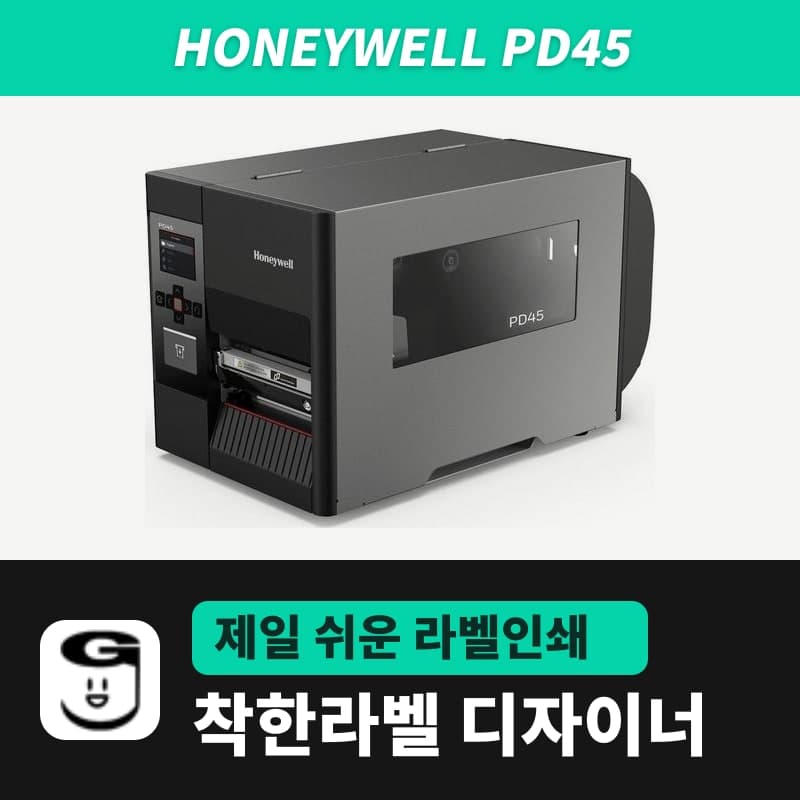
Honeywell PD45 label printer
The PD45 is Honeywell's industrial 4-inch printer that loads the roll and ribbon through a side door. It comes as the LED PD4500B or the LCD and Ethernet PD4500C, in 203dpi and 300dpi variants. In GoodLabel Designer, select the ZPL entry PD45 and set the printer command language to ZSim to print.
- Print method
- Thermal transfer and direct thermal
- Configurations
- PD4500C (2.36-inch keypad LCD), PD4500B (LED, Feed button)
- Resolution
- 203dpi (8 dots/mm), 300dpi (11.8 dots/mm)
- Print speed
- 203dpi 50–200mm/s (2–8ips), 300dpi 50–100mm/s (2–4ips)
- Max print width
- 108mm (203dpi), 105.7mm (300dpi)
- Max print length
- 4.8m (203dpi), 2.2m (300dpi)
Specifications
| Print method | Thermal transfer and direct thermal |
|---|---|
| Configurations | PD4500C (2.36-inch keypad LCD), PD4500B (LED, Feed button) |
| Resolution | 203dpi (8 dots/mm), 300dpi (11.8 dots/mm) |
| Print speed | 203dpi 50–200mm/s (2–8ips), 300dpi 50–100mm/s (2–4ips) |
| Max print width | 108mm (203dpi), 105.7mm (300dpi) |
| Max print length | 4.8m (203dpi), 2.2m (300dpi) |
| Media width and thickness | 20–114mm (including liner), 0.076–0.224mm |
| Min label length | Tear-off mode 5.0mm, cutter mode 38.0mm |
| Media roll | Max outer diameter 203.2mm, cores 76mm · 25.4mm, external roll and fanfold media |
| Ribbon | Ink side in and out, max roll diameter 80mm (about 450m), core 25.4mm, width 51–110mm, wax · wax/resin · resin |
| Command languages | Fingerprint, Direct Protocol, IPL, ZSim2 (ZPL-II), DPL |
| Interfaces | USB 2.0 Host and Device (both), Ethernet 10/100Mbps and RS-232 (PD4500C only) |
| Options | Wireless LAN card, cutter, dual serial (all PD4500C only) |
| Sold variants | PD-45 203dpi, PD-45 300dpi |
| GoodLabel Designer model | PD45 (ZPL, 203 · 300 DPI); PD45S is a separate entry |
| Dimensions and weight | 438×270×249mm, 9.25kg |
The Honeywell PD45 comes as the PD4500B with LED and Feed button and the PD4500C with keypad LCD and Ethernet, so decide on the connection type before ordering. It is sold as separate PD-45 203dpi and 300dpi variants, and with dual sensor position calibration it locates labels down to 5mm high.
PD4500B and PD4500C configurations
The PD45 comes under two product numbers with different displays and connection configurations. If several PCs will share it over a network or you plan to add a cutter, check which one your printer is first.
| Item | PD4500B | PD4500C |
|---|---|---|
| Display and buttons | LED, Feed button | 2.36-inch keypad LCD |
| USB 2.0 Host and Device | Yes | Yes |
| Ethernet 10/100Mbps | No | Yes |
| RS-232 | No | Yes |
| Wireless LAN card, cutter, dual serial | Not available | Options |
GoodLabel Designer sends print jobs to printers registered in Windows, so if the PD4500B is connected to one PC by USB, the Designer setup is no different.
Selecting the PD45 in GoodLabel Designer
The Designer list has PD45 and PD45S as separate ZPL entries, both with 203 DPI and 300 DPI resolution buttons. For the PD-45, choose the PD45 entry; if the Windows printer name contains PD45 and a resolution such as 203dpi, the model and resolution are filled in automatically.
The PD45 accepts Fingerprint, Direct Protocol, IPL, ZSim2 (ZPL-II) and DPL, so to process the ZPL that the Designer sends as RAW, the command language must be ZSim. Why the language is changed in the menu and the command order from ^XA to ^XZ are the same as in the PX4ie description.
Label and ribbon requirements for the PD45
- Media is 20–114mm wide including the liner and 0.076–0.224mm thick, and rolls up to 203.2mm outer diameter are loaded on a 76mm or 25.4mm core. It also feeds from a roll placed outside the printer or from fanfold media.
- Enter the width in Designer Printer settings within the width the printhead prints; the limit is 108mm for the 203dpi variant and 105.7mm for the 300dpi variant.
- Minimum label length is 5.0mm in tear-off mode and 38.0mm in cutter mode. For labels cut one at a time on a PD4500C with a cutter, set the height to 38mm or more in the Designer.
- Both ink-side-in and ink-side-out ribbon rolls can be used, with a 25.4mm core inner diameter and roll diameter up to 80mm (about 450m). Ribbon width is 51–110mm including the core, so even 30mm-wide labels take a ribbon of 51mm or more.
- Print speed is 50–200mm/s (2–8ips) at 203dpi and 50–100mm/s (2–4ips) at 300dpi, and the maximum continuous print length is 4.8m at 203dpi and 2.2m at 300dpi.
The top speed of the 300dpi variant, 100mm/s, is half the 200mm/s of the 203dpi variant. For high-volume output that needs to use up rolls quickly, the 203dpi variant fits; for parts labels with a lot of small text, the 300dpi variant with a dot pitch of about 0.085mm fits.
Compatible with GoodLabel Designer
You can design and print labels for this model with GoodLabel Designer, our free label software. GoodLabel Designer · User Guide
FAQ
- Should I choose PD45 or PD45S in the Designer list?
- For the PD-45, choose the PD45 entry. Both entries are ZPL with 203 · 300 DPI buttons, so the commands are the same, but matching the name avoids confusion in the Printer settings window and the status bar.
- Do I load a 30mm ribbon for 30mm-wide labels?
- The PD45 accepts ribbon widths of 51–110mm including the core. Even for 30mm-wide labels, load a ribbon of 51mm or more and position the roll so the labels fall within the ribbon width.
- Can the PD4500B configuration also be shared by several PCs over a network?
- Ethernet and wireless LAN are only on the PD4500C. Connect the PD4500B to one PC by USB, register it as a Windows printer, and print from the Designer on that PC.
Drivers & manuals
How to buy
- In Korea, this product is sold through our Korean online store. Korean product page →
- Outside Korea, contact us by email. Email: Contact →
- Or buy from an authorized dealer in your country.
Other models in this category
 Good LabelGoodLabel 4B-2054NS direct thermal label printerThe GoodLabel 4B-2054NS is a direct thermal only 4-inch printer driven by GoodLabel Designer in TSPL; the Gap length field value goes into the GAP command as is. GoodLabel 4B-2054NS, W-4B-2054NS and Xprinter 4B-2054N in the model list are all TSPL at 203 dpi, so each sends the same commands.
 BixolonBixolon SLP-DX220 label printerThe SLP-DX220 is a Bixolon 2-inch direct thermal printer, 54mm print width, 203dpi, up to 6ips, rolls 15–60mm wide. Select SLP-DX220 (ZPL, 203dpi) in the GoodLabel Designer model list, and the Troubleshoot window skips the print method step and guides only saving the label type and Detect media.
 BixolonBixolon SLP-DX223 label printerA 2-inch direct thermal printer for dense text and QR codes on small labels 10–20mm tall, using the SLP-DX220 body with a head of about 11.8 dots per mm (print width 56.9mm, max 4ips). In the Designer model list it appears under its sales name, SLP-DX223, with a single ZPL, 300dpi setting.
 BixolonBixolon SLP-DX420 label printerThe SLP-DX420 is a Bixolon 4-inch direct thermal only printer, 108mm wide at 203dpi and up to 7ips, suited to printing many thermal labels such as 100×150mm shipping labels. In GoodLabel Designer, select SLP-DX420 (ZPL, 203dpi); copies of the same label go as one ^PQ quantity command.
 BixolonBixolon SLP-DX423 label printerFor the SLP-DX423, you must select the SLP-DX423 (ZPL, 300dpi) entry in GoodLabel Designer; if you send to the 203dpi SLP-DX420 entry, labels come out shrunk to about 68% of their size. The printer is a Bixolon 4-inch direct thermal only model with a 105.7mm print width and a max speed of 5ips.
 BixolonBixolon SLP-TX400 label printerIn the GoodLabel Designer Troubleshoot window, the print method step (thermal transfer or direct thermal) appears only when the Printer model field shows SLP-TX400. It is a Bixolon 4-inch thermal transfer and direct thermal printer (203dpi, 108mm, max 7ips); Designer entry: SLP-TX400 (ZPL, 203dpi).