
TSC · Label printers
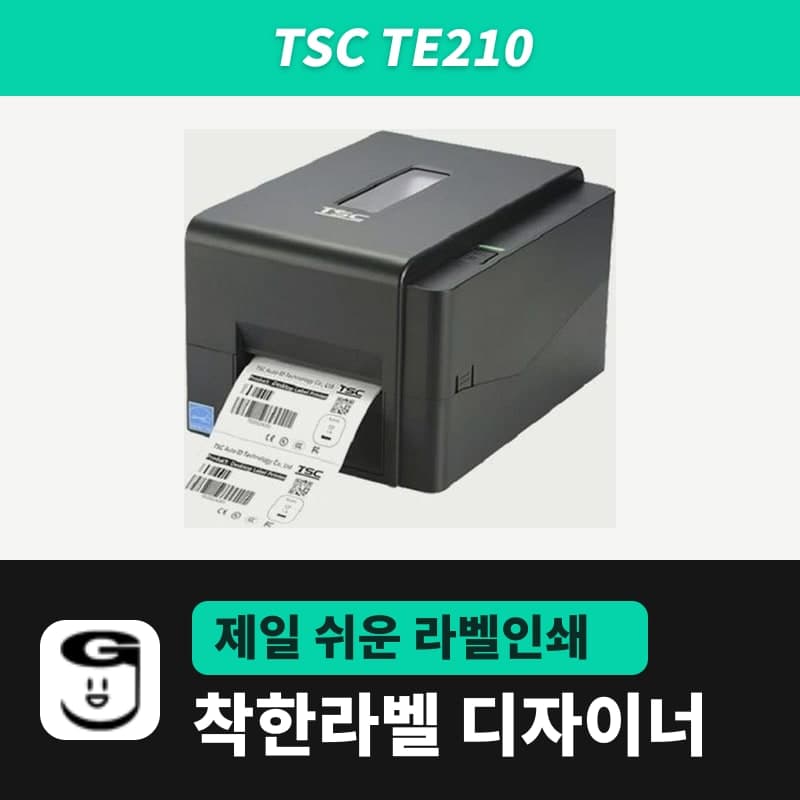
TSC TE210 label printer
To print to a TSC TE210 with GoodLabel Designer, select the model TE210 and resolution 203; the label size, gap and print method in Printer settings are sent as TSPL commands (SIZE, GAP, SET RIBBON). It takes ribbons 40–110 mm wide with the ink side out and media 20–112 mm wide.
- Print method
- Thermal transfer and direct thermal
- Resolution
- 203 dpi (8 dots/mm)
- Max print speed
- 152.4 mm/s (6 ips)
- Max print width
- 108 mm
- Max print length
- 25,400 mm
- Media width and thickness
- 20–112 mm, 0.06–0.19 mm
Specifications
| Print method | Thermal transfer and direct thermal |
|---|---|
| Resolution | 203 dpi (8 dots/mm) |
| Max print speed | 152.4 mm/s (6 ips) |
| Max print width | 108 mm |
| Max print length | 25,400 mm |
| Media width and thickness | 20–112 mm, 0.06–0.19 mm |
| Media roll | 127 mm outer diameter, 25.4 mm and 38 mm core inner diameter, wound printed side out |
| Gap and black mark | Gap 2 mm or more, black mark height 2 mm and width 8 mm or more |
| Sensors | Transmissive gap sensor (fixed), reflective black mark sensor (adjustable position), ribbon end, head open |
| Ribbon | 300 m (1-inch core, 67 mm outer diameter) · 110 m (0.5-inch core, 40 mm outer diameter), ink side out |
| Ribbon width | 40–110 mm |
| Printer language | TSPL-EZD (EPL, ZPL, ZPL II, DPL compatible) |
| Interfaces | USB 2.0, Ethernet 10/100 Mbps, RS-232, USB host |
| GoodLabel Designer model | TE210 (TSPL, 203 dpi) |
| Operating environment | 5–40°C, 25–85% humidity (non-condensing) |
| Dimensions and weight | 204×164×280 mm, 2.5 kg |
In the GoodLabel Designer model list, the TSC TE210 is registered as a 203 dpi printer that uses TSPL commands, so the only resolution option is 203. Label size, gap and whether a ribbon is used are carried in the SIZE, GAP and SET RIBBON commands and go directly to the printer without passing through the driver.
Designer Printer settings and the commands sent to the TE210
| Designer item | Selected setting | TSPL command sent to the TE210 |
|---|---|---|
| Label size | Width and height (mm) | SIZE width mm,height mm |
| Media type | Gap labels | GAP (gap length) mm,0 mm |
| Media type | Continuous media | GAP 0 mm,0 mm |
| Media type | Black mark | BLINE 3 mm,0 mm |
| Print method | Thermal transfer / Direct thermal | SET RIBBON ON / SET RIBBON OFF |
| Density | 0–15, default 11 | DENSITY |
| Speed | 1–10, default 3 | SPEED |
This mapping holds in the default state with "Print as image" in the print options turned off. If you check that box, the Designer prints through the Windows driver and the media settings also follow the driver.
Steps to the first label
- Register the TE210 as a Windows printer with the TSC printer unified driver (2024.3) from the download center. When you search for a TSC model in the Designer's Printer settings window, a Download driver button appears that leads to the same file.
- Select the registered TE210 in the printer field and TE210 in the printer model field. If you select a printer whose name contains TE210, the model and 203 dpi are filled in together.
- Slide the label roll between the sensors with the printed side up, and move the media guides against the roll width. The gap sensor is fixed in place and only the black mark sensor moves, so for black mark rolls, align the sensor with the line where the marks pass.
- Choose the print method and media type in Printer settings, and for gap labels, enter the actual gap between labels in Gap length. In the TE210 media spec, the gap is 2 mm or more.
- For black mark rolls, click the Detect black mark button in Printer settings to send the AUTODETECT command, then turn the power off and on as instructed to print right away.
- If the test print is faint, raise the density above 11; if the position shifts down, enter a negative value in Vertical offset under Advanced settings to pull it up.
Check the menu locations and screens with illustrations in the Printing chapter of the guide.
Labels and ribbons for the TE210
Media is 20–112 mm wide and 0.06–0.19 mm thick, and rolls with 1-inch (25.4 mm) and 1.5-inch (38 mm) core inner diameters load up to 127 mm in outer diameter. Only rolls wound with the printed side out are accepted, and black marks must be at least 2 mm high and 8 mm wide to be read.
Use only ribbons wound with the ink side out. The limits are 67 mm outer diameter on a 1-inch core for 300 m rolls and 40 mm outer diameter on a 0.5-inch core for 110 m rolls, and the width is 40–110 mm. The eight widths of 40–110 mm in the 300 m variant of the GoodLabel wax ribbon overlap this range, and those rolls have an OUTSIDE marking on the end face.
The max print width is 108 mm, so labels up to 100 mm wide print in one pass. For GoodLabel thermal roll labels, used without a ribbon, remove the ribbon and set the print method to Direct thermal (SET RIBBON OFF).
Fixes for skipped labels and stops by symptom
If labels are skipped one at a time, first check that the label size and gap length in Printer settings match the actual roll. If both are correct and it continues, blow the dust off the sensor with a blower and run Detect media again.
When the LED flashes red and the printer stops, there are three causes — ribbon, labels or paper jam — and the TSC Console status message tells you which one. If the red light is on steadily without flashing, the head cover is open (Head Open).
| TSC Console status | Cause | Fix |
|---|---|---|
| Ribbon End Err. / Ribbon Encoder Err. | Ribbon has run out or is loaded incorrectly | Replace with a new ribbon roll or reload the ribbon |
| Out of Paper | Out of labels, roll loaded incorrectly, gap/black mark sensor not calibrated | Load a new roll correctly, then run Detect media |
| Paper Jam | Label stuck inside the mechanism, label size or sensor setting mismatch | Remove the stuck label, check the label size, then run Detect media |
Compatible with GoodLabel Designer
You can design and print labels for this model with GoodLabel Designer, our free label software. GoodLabel Designer · User Guide
FAQ
- Can I change the TE210 resolution to 300 in the Designer?
- The TE210 comes only in 203 dpi, so the only resolution option is 203. If you need 300 dpi, the TE310 (300 dpi) in the Designer model list is the model in the same series.
- Can it print on continuous media without gaps, such as receipts?
- The TE210 accepts continuous media. Change the media type in the Designer's Printer settings to Continuous media, and the GAP 0 mm command is sent, while the document height is carried in the SIZE command and becomes the length of each piece.
- Do I also need to change the paper size in the TSC driver?
- In standard RAW printing, the label size in the Designer's Printer settings is sent as the SIZE command, so you only need to set it in the Designer. The driver's media settings are used only when "Print as image" is checked.
- The first label is still off after Detect black mark.
- After the AUTODETECT command is sent, you must turn the TE210 off and on for it to print with the new setting. Also check that the black mark sensor is on the line where the marks pass and that the marks are at least 2 mm high and 8 mm wide.
Drivers & manuals
How to buy
- In Korea, this product is sold through our Korean online store. Korean product page →
- Outside Korea, contact us by email. Email: Contact →
- Or buy from an authorized dealer in your country.
Other models in this category
 Good LabelGoodLabel 4B-2054NS direct thermal label printerThe GoodLabel 4B-2054NS is a direct thermal only 4-inch printer driven by GoodLabel Designer in TSPL; the Gap length field value goes into the GAP command as is. GoodLabel 4B-2054NS, W-4B-2054NS and Xprinter 4B-2054N in the model list are all TSPL at 203 dpi, so each sends the same commands.
 BixolonBixolon SLP-DX220 label printerThe SLP-DX220 is a Bixolon 2-inch direct thermal printer, 54mm print width, 203dpi, up to 6ips, rolls 15–60mm wide. Select SLP-DX220 (ZPL, 203dpi) in the GoodLabel Designer model list, and the Troubleshoot window skips the print method step and guides only saving the label type and Detect media.
 BixolonBixolon SLP-DX223 label printerA 2-inch direct thermal printer for dense text and QR codes on small labels 10–20mm tall, using the SLP-DX220 body with a head of about 11.8 dots per mm (print width 56.9mm, max 4ips). In the Designer model list it appears under its sales name, SLP-DX223, with a single ZPL, 300dpi setting.
 BixolonBixolon SLP-DX420 label printerThe SLP-DX420 is a Bixolon 4-inch direct thermal only printer, 108mm wide at 203dpi and up to 7ips, suited to printing many thermal labels such as 100×150mm shipping labels. In GoodLabel Designer, select SLP-DX420 (ZPL, 203dpi); copies of the same label go as one ^PQ quantity command.
 BixolonBixolon SLP-DX423 label printerFor the SLP-DX423, you must select the SLP-DX423 (ZPL, 300dpi) entry in GoodLabel Designer; if you send to the 203dpi SLP-DX420 entry, labels come out shrunk to about 68% of their size. The printer is a Bixolon 4-inch direct thermal only model with a 105.7mm print width and a max speed of 5ips.
 BixolonBixolon SLP-TX400 label printerIn the GoodLabel Designer Troubleshoot window, the print method step (thermal transfer or direct thermal) appears only when the Printer model field shows SLP-TX400. It is a Bixolon 4-inch thermal transfer and direct thermal printer (203dpi, 108mm, max 7ips); Designer entry: SLP-TX400 (ZPL, 203dpi).