
Godex · Label printers
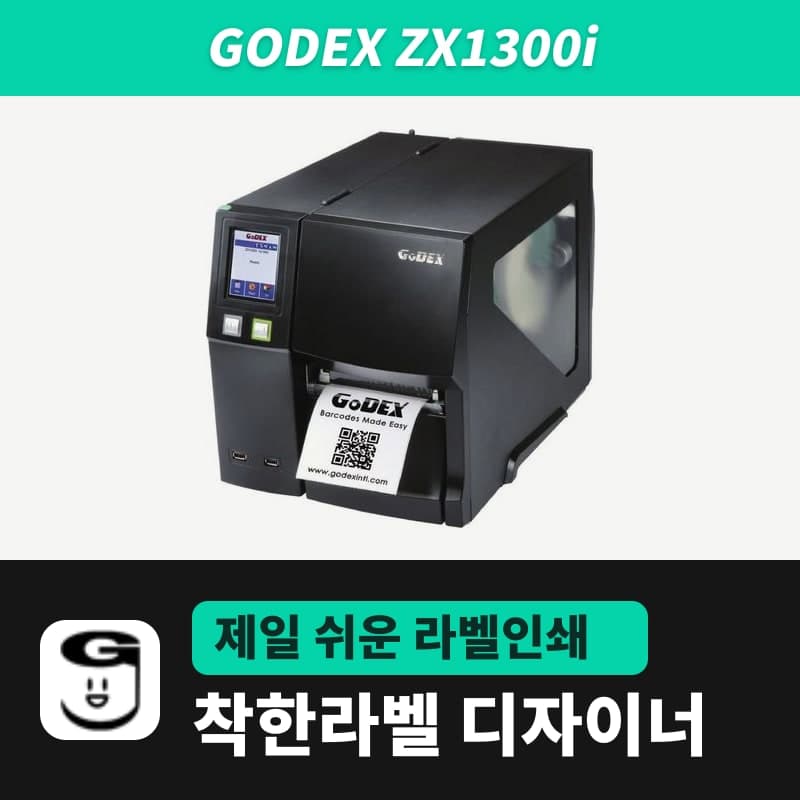
Godex ZX1300i label printer
The Godex ZX1300i is the 300dpi industrial model of the ZX1000i series, printing up to 105.7mm wide and 2,159mm per label at 177mm per second, with user-set ribbon tension and head pressure. Choose the ZX1300i (EZPL, 300dpi) entry in GoodLabel Designer and the resolution is fixed automatically.
- Print method
- Thermal transfer and direct thermal
- Resolution
- 300dpi (12 dots/mm)
- Max print speed
- 177mm/s (7ips)
- Max print width
- 105.7mm
- Print length
- 4-2,159mm (label height in GoodLabel Designer goes up to 1000mm)
- Sensors
- Reflective and see-through sensors, left-aligned
Specifications
| Print method | Thermal transfer and direct thermal |
|---|---|
| Resolution | 300dpi (12 dots/mm) |
| Max print speed | 177mm/s (7ips) |
| Max print width | 105.7mm |
| Print length | 4-2,159mm (label height in GoodLabel Designer goes up to 1000mm) |
| Sensors | Reflective and see-through sensors, left-aligned |
| Media | Width 25.4-118mm (up to 117mm with cutter), thickness 0.06-0.25mm, roll outer diameter 203.2mm, core 38.1-76.2mm |
| Ribbon | Wax, wax-resin, resin; up to 450m; width 30-110mm; roll outer diameter 76.2mm; 1-inch core |
| Ribbon tension | Supply spindle knob with 4 levels (1 strongest, 4 weakest) |
| Interfaces | USB 2.0, RS-232 (DB-9), Ethernet 10/100, 3 USB host ports |
| GoodLabel Designer model | ZX1300i (EZPL, 300dpi) |
The Godex ZX1300i is the industrial model with a 300dpi head in the ZX1000i series, printing up to 105.7mm wide and 2,159mm per label at 177mm per second (7ips). The ZX1300i entry registered in GoodLabel Designer is EZPL with only one resolution, 300, so setup is complete once you choose the queue and specify the model.
Designer entries by resolution in the ZX1000i series
| Model | Resolution | Max speed | Max length per label | Designer entry |
|---|---|---|---|---|
| ZX1200i | 203dpi | 254mm/s (10ips) | 4,572mm | ZX1200i (EZPL, 203) |
| ZX1300i | 300dpi | 177mm/s (7ips) | 2,159mm | ZX1300i (EZPL, 300) |
| ZX1600i | 600dpi | 101.6mm/s (4ips) | 660mm | ZX1600i (EZPL, 600) |
The three models share the same sensor layout (left-aligned), roll requirements (outer diameter 203.2mm, core 38.1-76.2mm) and ribbon requirements (450m, width 30-110mm); only the head resolution and the resulting speed and length limits differ. Roll and sensor details are collected on the ZX1200i page, and which EZPL command each Printer settings field is sent as is in the table on the G500 page.
At 300dpi, 1mm is about 11.8 dots, so a 40x30mm label is drawn 473 dots wide and 355 dots high. The designer Height field goes up to 1000mm, so the designer's limit is reached before the ZX1300i's 2,159mm limit.
Narrow ribbons and one-sided fading adjustment
The industrial ZX is built so that the user changes ribbon tension and head pressure directly. If wrinkles or one-sided fading appear in a designer test print, adjust the printer in the order below.
- Pressing and turning the ribbon supply spindle knob changes the tension in 4 levels, from 1 (strongest) to 4 (weakest).
- Ribbons narrower than 2 inches (50.8mm) sometimes cannot push the label through, so when loading the 40mm width of GoodLabel wax ribbon 300M, turn the supply spindle knob counterclockwise to lower the tension.
- If one side of the label is blank or the ribbon wrinkles, widen the spacing of the two spring boxes above the head to match the label width; if it stays the same, change the pressure with the screw. Do not turn the screw below mark B.
- If wrinkles continue, turn the ribbon shield screw half a turn at a time while test printing, and do not turn it more than two turns. If you have gone past that, realign it with the reference mark and start the adjustment over.
If prints are still faint after adjusting the printer, raise the density in the designer's Print window (0-19, default 13) one step at a time. Density is sent with ^H on every label, so it changes from the next label.
Compatible with GoodLabel Designer
You can design and print labels for this model with GoodLabel Designer, our free label software. GoodLabel Designer · User Guide
FAQ
- Can I choose the ZX1300Xi entry?
- The ZX1300Xi entry is also registered as EZPL, 300dpi, so the designer sends the same commands. If the queue name is ZX1300i, the ZX1300i entry is detected automatically.
- Does the size change if I print a file made for the ZX1200i on the ZX1300i?
- The label size is saved in mm, so it stays the same. When you change the model to ZX1300i in Printer settings, the resolution changes to 300dpi and barcode widths and module sizes are recalculated.
- I turned the ribbon shield screw several times, and now the media does not feed correctly.
- Turning the shield screw more than two turns throws off media feeding. Loosen the screw, realign it with the reference mark, then turn it half a turn at a time while repeating test prints.
Drivers & manuals
How to buy
- In Korea, this product is sold through our Korean online store. Korean product page →
- Outside Korea, contact us by email. Email: Contact →
- Or buy from an authorized dealer in your country.
Other models in this category
 Good LabelGoodLabel 4B-2054NS direct thermal label printerThe GoodLabel 4B-2054NS is a direct thermal only 4-inch printer driven by GoodLabel Designer in TSPL; the Gap length field value goes into the GAP command as is. GoodLabel 4B-2054NS, W-4B-2054NS and Xprinter 4B-2054N in the model list are all TSPL at 203 dpi, so each sends the same commands.
 BixolonBixolon SLP-DX220 label printerThe SLP-DX220 is a Bixolon 2-inch direct thermal printer, 54mm print width, 203dpi, up to 6ips, rolls 15–60mm wide. Select SLP-DX220 (ZPL, 203dpi) in the GoodLabel Designer model list, and the Troubleshoot window skips the print method step and guides only saving the label type and Detect media.
 BixolonBixolon SLP-DX223 label printerA 2-inch direct thermal printer for dense text and QR codes on small labels 10–20mm tall, using the SLP-DX220 body with a head of about 11.8 dots per mm (print width 56.9mm, max 4ips). In the Designer model list it appears under its sales name, SLP-DX223, with a single ZPL, 300dpi setting.
 BixolonBixolon SLP-DX420 label printerThe SLP-DX420 is a Bixolon 4-inch direct thermal only printer, 108mm wide at 203dpi and up to 7ips, suited to printing many thermal labels such as 100×150mm shipping labels. In GoodLabel Designer, select SLP-DX420 (ZPL, 203dpi); copies of the same label go as one ^PQ quantity command.
 BixolonBixolon SLP-DX423 label printerFor the SLP-DX423, you must select the SLP-DX423 (ZPL, 300dpi) entry in GoodLabel Designer; if you send to the 203dpi SLP-DX420 entry, labels come out shrunk to about 68% of their size. The printer is a Bixolon 4-inch direct thermal only model with a 105.7mm print width and a max speed of 5ips.
 BixolonBixolon SLP-TX400 label printerIn the GoodLabel Designer Troubleshoot window, the print method step (thermal transfer or direct thermal) appears only when the Printer model field shows SLP-TX400. It is a Bixolon 4-inch thermal transfer and direct thermal printer (203dpi, 108mm, max 7ips); Designer entry: SLP-TX400 (ZPL, 203dpi).