
TSC · Label printers
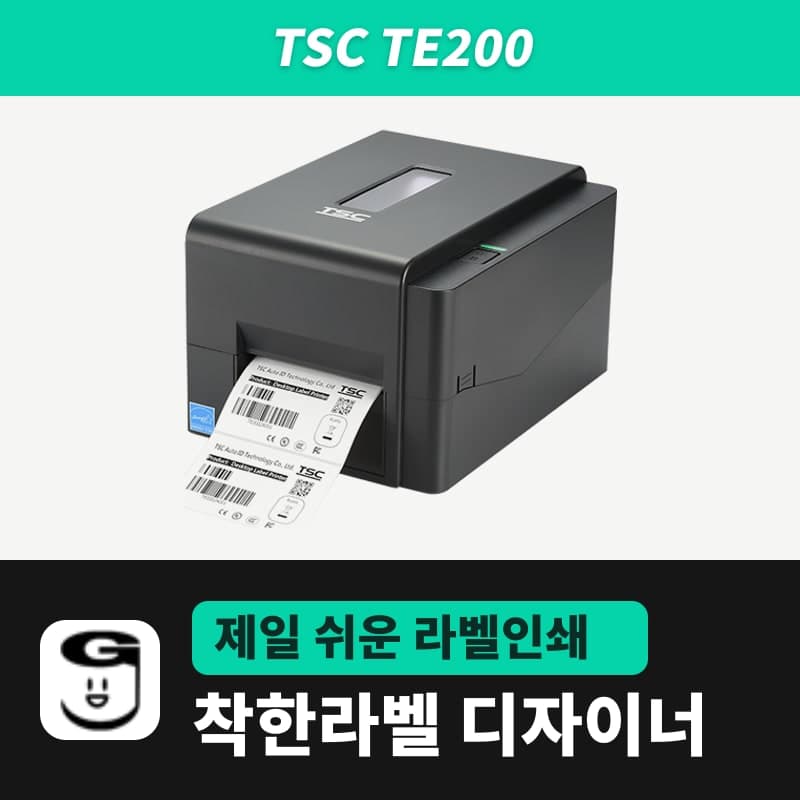
TSC TE200 label printer
The TSC TE200 prints at the same 203 dpi, 152.4 mm/s and 108 mm print width as the TE210, but has a single USB 2.0 port and no real-time clock or peel-off/cutter options. In GoodLabel Designer it is the model TE200 (TSPL, 203 dpi), and the PC sends the label size and gap as commands over USB.
- Print method
- Thermal transfer and direct thermal
- Resolution
- 203 dpi (8 dots/mm), dot size 0.125 mm
- Max print speed
- 152.4 mm/s (6 ips)
- Max print width
- 108 mm
- Label length
- 5–2,794 mm
- Media width and thickness
- 20–112 mm, 0.06–0.19 mm
Specifications
| Print method | Thermal transfer and direct thermal |
|---|---|
| Resolution | 203 dpi (8 dots/mm), dot size 0.125 mm |
| Max print speed | 152.4 mm/s (6 ips) |
| Max print width | 108 mm |
| Label length | 5–2,794 mm |
| Media width and thickness | 20–112 mm, 0.06–0.19 mm |
| Media roll | Internal: 127 mm outer diameter, 25.4/38 mm core; external roll mount (user option): 214 mm outer diameter, 76.2 mm core |
| Gap and black mark | Gap 2 mm or more, black mark height 2 mm and width 8 mm or more |
| Ribbon | 300 m (1-inch core, 67 mm outer diameter) · 110 m (0.5-inch core, 40 mm outer diameter), ink side out, width 40–110 mm |
| Interfaces | USB 2.0 (built-in Bluetooth 4.0 is a factory option) |
| Real-time clock and buzzer | None |
| Peel-off and cutter | Not available (options for TE210 and TE310 only) |
| Printer language | TSPL-EZD (EPL, ZPL, ZPL II, DPL compatible) |
| GoodLabel Designer model | TE200 (TSPL, 203 dpi) |
| Operating environment | 5–40°C, 25–85% humidity (non-condensing) |
| Dimensions and weight | 204×164×280 mm, 2.4 kg |
The TSC TE200 has the same 203 dpi resolution, 152.4 mm/s max speed and 108 mm print width as the TE210, but the only port on the back is a single USB 2.0 port. Without Ethernet, RS-232 or USB host, it is set up to sit next to one PC and connect directly with a USB cable, so the GoodLabel Designer setup is also done for that one PC.
What the TE200 can do by label task
| Task | On the TE200 | Relevant spec |
|---|---|---|
| Printing shipping and product labels from one PC | Works with a single USB cable. | USB 2.0 standard |
| Several office PCs sharing one printer over a wired LAN | The printer has no LAN port, so move to the TE210 (10/100 Mbps Ethernet standard). | No Ethernet, RS-232 or USB host |
| Manufacturing and expiration date labels | Works, because the Designer inserts the date from the PC time before sending. | No real-time clock or buzzer |
| Peeling or cutting labels one at a time | A peel-off module or cutter cannot be installed. | Both options are for the TE210 and TE310 only |
| A single label longer than 1 m | The Designer label height goes up to 1000 mm, so a single label longer than 1 m cannot be made. | Printer label length is 5–2,794 mm |
| Large rolls on 3-inch cores | With the external roll mount (user option), rolls up to 214 mm in outer diameter can be loaded. | Internal roll limit of 127 mm (outer diameter) |
Direct thermal and thermal transfer support, 20–112 mm media width, 40–110 mm ribbon width and the 204×164×280 mm size are the same as the TE210. The differences are max print length (TE200 2,794 mm, TE210 25,400 mm), memory (TE200 8 MB flash and 16 MB SDRAM, TE210 128 MB and 64 MB) and weight (2.4 kg, 0.1 kg lighter). The TE200 is also sold in only one connection variant: USB.
Setting up the Designer on a single USB connection
Install the TSC unified driver on the PC connected by USB cable so the TE200 appears in the Windows printer list. When you select this printer in the Designer's printer field, if its name contains "TE200", the model TE200 and a resolution of 203 DPI are filled in together. If the model is not found from the name, search for TE200 in the printer model field and select it; the only resolution option shown is 203.
After that, printing goes directly over USB as TSPL commands without passing through the driver's media settings. The label size is carried in SIZE and the gap between gap labels in the GAP command, so enter the actual roll's gap in the Gap length field in Printer settings (default 3 mm, in 0.5 mm steps). A roll with a gap narrower than 2 mm is outside the TE200 sensor spec.
Whether to use Direct thermal, Thermal transfer or Printer settings depends on the supplies loaded that day; see the TTP-247 page for the command each option sends.
Date labels on the TE200 without a clock
The TE200 has no real-time clock. The Designer's date and time inputs create the text from the PC time at the moment you click the print button and send that text inside the label image. So manufacturing date and expiration date labels print without any setting on the TE200, and if you enter a number of days in Date offset, the date that many days after today is inserted. The date format and offset fields are in the Text chapter of the guide.
Roll size and the external roll mount
Inside the printer, rolls with core inner diameters of 25.4 mm and 38 mm fit up to 127 mm in outer diameter, and only rolls wound with the printed side out are accepted. Large rolls on a 76.2 mm (3-inch) core up to 214 mm in outer diameter are loaded by attaching the external roll mount, a user option, under the printer and feeding through the rear opening. The sensor needs to be recalibrated each time you change rolls, so run Detect media (TSPL AUTODETECT) once in the Designer's printer Troubleshoot window.
The ribbon conditions are the same as the TE210, so choose the roll shape, length and width from the ribbon section of the TE210 page. On days without a ribbon, print GoodLabel thermal roll labels with Direct thermal.
Causes and fixes for faint print, wrinkles and gray lines
| Symptom | Causes listed by TSC | Fix |
|---|---|---|
| Print is faint or broken | Ribbon or media loaded incorrectly, dust or adhesive on the head, density setting, damaged head elements, ribbon and media compatibility | Reload the ribbon and media and check that the head mechanism is fully latched, then clean the head and platen roller and adjust Density (0–15, default 11) and Speed in the Designer. If the self-test pattern shows missing dots, it is a head problem; trying a different ribbon and label combination is also part of the fix. |
| Labels wrinkle | Ribbon loaded incorrectly, media loaded incorrectly, density setting, media feed problem | Adjust the density and move the label guides against the media edges. |
| Gray lines on blank labels | Dirty head, dirty platen roller | Clean the head and platen roller. |
The Designer's Density field is sent as the TSPL DENSITY command, so this adjustment takes effect only when "Print as image" is turned off.
Compatible with GoodLabel Designer
You can design and print labels for this model with GoodLabel Designer, our free label software. GoodLabel Designer · User Guide
FAQ
- Can I connect the TE200 to a wired LAN and print from several PCs?
- The TE200 has no Ethernet port; only USB 2.0 is standard. If you need a wired LAN connection, choose the TE210, which has Ethernet 10/100 Mbps as standard; resolution, speed and print width are the same, and the max print length is longer at 25,400 mm.
- Will printing work if I select TE210 instead of TE200 as the Designer model?
- Both entries are TSPL at 203 dpi, so the Designer builds the same commands. However, if the printer name contains TE200, TE200 is filled in from the start, so you can leave it as is.
- Do I need to set the printer clock to print expiration dates?
- No. The Designer's date element is created from the PC time at the moment of printing and sent inside the label image, so even the TE200, which has no clock, prints the date including any Date offset in days.
- Can I install a peel-off module that separates labels one at a time?
- The peel-off module and cutter are options for the TE210 and TE310 and cannot be installed on the TE200. If you often peel and apply labels one at a time, choose the TE210, which has the same resolution, speed and print width.
Drivers & manuals
How to buy
- In Korea, this product is sold through our Korean online store. Korean product page →
- Outside Korea, contact us by email. Email: Contact →
- Or buy from an authorized dealer in your country.
Other models in this category
 Good LabelGoodLabel 4B-2054NS direct thermal label printerThe GoodLabel 4B-2054NS is a direct thermal only 4-inch printer driven by GoodLabel Designer in TSPL; the Gap length field value goes into the GAP command as is. GoodLabel 4B-2054NS, W-4B-2054NS and Xprinter 4B-2054N in the model list are all TSPL at 203 dpi, so each sends the same commands.
 BixolonBixolon SLP-DX220 label printerThe SLP-DX220 is a Bixolon 2-inch direct thermal printer, 54mm print width, 203dpi, up to 6ips, rolls 15–60mm wide. Select SLP-DX220 (ZPL, 203dpi) in the GoodLabel Designer model list, and the Troubleshoot window skips the print method step and guides only saving the label type and Detect media.
 BixolonBixolon SLP-DX223 label printerA 2-inch direct thermal printer for dense text and QR codes on small labels 10–20mm tall, using the SLP-DX220 body with a head of about 11.8 dots per mm (print width 56.9mm, max 4ips). In the Designer model list it appears under its sales name, SLP-DX223, with a single ZPL, 300dpi setting.
 BixolonBixolon SLP-DX420 label printerThe SLP-DX420 is a Bixolon 4-inch direct thermal only printer, 108mm wide at 203dpi and up to 7ips, suited to printing many thermal labels such as 100×150mm shipping labels. In GoodLabel Designer, select SLP-DX420 (ZPL, 203dpi); copies of the same label go as one ^PQ quantity command.
 BixolonBixolon SLP-DX423 label printerFor the SLP-DX423, you must select the SLP-DX423 (ZPL, 300dpi) entry in GoodLabel Designer; if you send to the 203dpi SLP-DX420 entry, labels come out shrunk to about 68% of their size. The printer is a Bixolon 4-inch direct thermal only model with a 105.7mm print width and a max speed of 5ips.
 BixolonBixolon SLP-TX400 label printerIn the GoodLabel Designer Troubleshoot window, the print method step (thermal transfer or direct thermal) appears only when the Printer model field shows SLP-TX400. It is a Bixolon 4-inch thermal transfer and direct thermal printer (203dpi, 108mm, max 7ips); Designer entry: SLP-TX400 (ZPL, 203dpi).