
TSC · Label printers
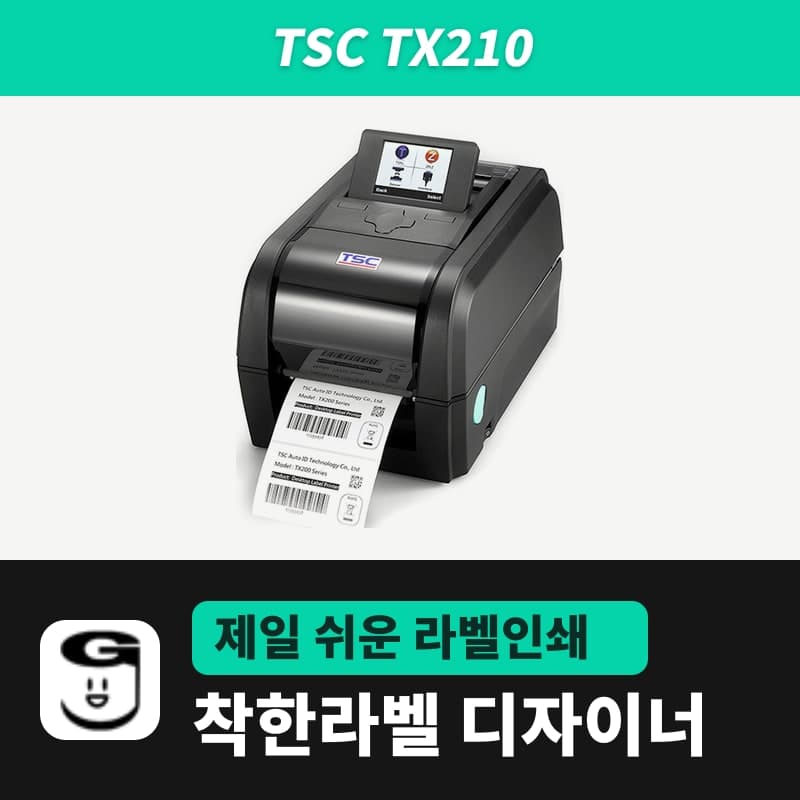
TSC TX210 label printer
203 mm per second, a 108 mm print width and 25,400 mm per label are unique to the TX210 among the three TSC TX series models, suiting it to high volumes of 100×150 mm shipping labels. Select the GoodLabel Designer model TX210 (TSPL, 203 dpi), then set only the print method and media type.
- Print method
- Thermal transfer and direct thermal
- Resolution
- 203 dpi (8 dots/mm)
- Max print speed
- 203 mm/s (8 ips)
- Max print width
- 108 mm
- Label length
- 3–25,400 mm
- Media width and thickness
- 19–112 mm, 0.055–0.254 mm
Specifications
| Print method | Thermal transfer and direct thermal |
|---|---|
| Resolution | 203 dpi (8 dots/mm) |
| Max print speed | 203 mm/s (8 ips) |
| Max print width | 108 mm |
| Label length | 3–25,400 mm |
| Media width and thickness | 19–112 mm, 0.055–0.254 mm |
| Media roll | 127 mm outer diameter, 25.4–38.1 mm core inner diameter, wound printed side out |
| Media types | Continuous, gap labels (die-cut), black mark, fan-fold, notched |
| Ribbon | 300 m, 1-inch core, outer diameter 67 mm or less, ink side out |
| Ribbon width | 40–110 mm |
| Sensors | Transmissive gap, reflective black mark (adjustable position), ribbon encoder, head open (ribbon end sensor is a factory option) |
| Controls | LED panel with 8 icons, one FEED/PAUSE button (3.5-inch color LCD is a factory option) |
| Printer language | TSPL-EZD (EPL, ZPL, ZPL II, DPL compatible) |
| Interfaces | USB 2.0, RS-232, USB host, Ethernet 10/100 Mbps |
| Power | External adapter, output DC 24V 3.75A 90W |
| GoodLabel Designer model | TX210 (TSPL, 203 dpi) |
| Operating environment | 5–40°C, 25–85% humidity (non-condensing) |
| Dimensions and weight | 226×198×332 mm, 3.75 kg |
The TX210 is the 203 dpi model among the three TSC TX series models. It prints up to 203 mm per second and accepts single labels up to 25,400 mm long, and its print width of 108 mm is 2 mm wider than the TX310 and TX610 (106 mm), so it prints 100 mm wide shipping labels with margin on both sides.
The front of the printer has only an LED panel that lights 8 large icons and one FEED/PAUSE button. The 3.5-inch color LCD is a factory option on the TX210, so in the standard configuration, sensor calibration is done with the button or with commands sent by GoodLabel Designer.
Designer print options by roll type
In the GoodLabel Designer model list, the TX210 is listed with the TSPL command language and a single resolution of 203 dpi. If the name registered in Windows with the TSC unified driver contains TX210, the printer model and resolution are filled in together; if not, search for TX210 in the printer model field and select it.
| Loaded roll | Print method | Media type and what to enter |
|---|---|---|
| Direct thermal gap labels (no ribbon) | Direct thermal | Gap labels, the roll's actual gap in the Gap length field |
| Coated paper gap labels + 300 m ribbon | Thermal transfer | Gap labels, the roll's actual gap in the Gap length field |
| Continuous direct thermal paper without gaps | Direct thermal | Continuous media, with the cut length set as the document height |
| Media with black marks on the back | Choose to match the roll | Black mark, with the mark position set by the sensor calibration below |
The number of TSPL command lines each option turns into is shown in a table on the TTP-247 page. At the head of a job, SIZE, GAP (or BLINE) and DIRECTION 1 come first, followed by SET RIBBON.
Two ways to calibrate the sensor on the LED model
On the PC side, clicking "Detect media" in the Troubleshoot window from the Designer's ribbon sends the AUTODETECT command to the TX210. When the media type is Black mark, the "Detect black mark" button in Printer settings also sends the same command, and when it finishes, a message tells you to turn the printer off and on.
To do it on the printer alone without a PC, hold the FEED button with the power off, turn the power on, then watch the LED color and count the flashes, and release at the stage you want. Three stages are used for calibration.
| When to release the button | Calibration performed |
|---|---|
| First set of 5 red flashes | Gap/black mark sensor calibration |
| Fourth set of 5 red flashes | Black mark calibration |
| 5 green flashes | Gap calibration |
Releasing at the third red flash in between returns the printer settings to factory defaults, so if gap calibration is your goal, let all the red stages pass and release when green flashes.
Choosing 100 mm wide rolls and 300 m ribbons
Media is 19–112 mm wide and 0.055–0.254 mm thick, and rolls with a core inner diameter of 25.4–38.1 mm load up to 127 mm in outer diameter. Only rolls wound with the printed side out are accepted, and continuous, gap label, black mark, fan-fold and notched media can be used.
The widest GoodLabel thermal roll label is 100 mm, which fits within the 108 mm print width, and the 100×150 mm size among them matches the Designer's shared shipping template. The core inner diameter is not shown in the variant names, so check that the roll you receive is in the 25.4–38.1 mm range before loading it.
The TX series ribbon compartment takes only 300 m rolls on a 1-inch core, so for the GoodLabel wax ribbon too, choose the 300 m variant instead of the 74 m. Even a thick roll fits only up to 67 mm, the coated side must be wound out, and widths from 40 mm to 110 mm are accepted. The TX310 and TX610 have the same conditions.
Compatible with GoodLabel Designer
You can design and print labels for this model with GoodLabel Designer, our free label software. GoodLabel Designer · User Guide
FAQ
- Can I make a label as long as the TX210 maximum in the Designer?
- The Designer label height is 1–1000 mm in the New document window and 5–1000 mm in the Printer settings panel. The TX210 accepts up to 25,400 mm per label, but a single label made with the Designer is limited to 1 m.
- Are the Designer settings the same if I connect the TX210 over Ethernet?
- The Designer sends TSPL commands by the printer name registered in Windows, so whether that printer is connected by USB or registered on an Ethernet port, the model and print options stay the same. Ethernet 10/100 Mbps is standard on the TX210.
- Can I load label rolls with a 3-inch core on the TX210?
- Only rolls with a core inner diameter of 25.4–38.1 mm and an outer diameter up to 127 mm fit inside the printer. Load 3-inch core rolls on the external roll mount (label spindle for 3-inch cores; a user option in the manual, a dealer option in datasheet V0322), and feed the media through the external label entry at the back of the printer.
Drivers & manuals
How to buy
- In Korea, this product is sold through our Korean online store. Korean product page →
- Outside Korea, contact us by email. Email: Contact →
- Or buy from an authorized dealer in your country.
Other models in this category
 Good LabelGoodLabel 4B-2054NS direct thermal label printerThe GoodLabel 4B-2054NS is a direct thermal only 4-inch printer driven by GoodLabel Designer in TSPL; the Gap length field value goes into the GAP command as is. GoodLabel 4B-2054NS, W-4B-2054NS and Xprinter 4B-2054N in the model list are all TSPL at 203 dpi, so each sends the same commands.
 BixolonBixolon SLP-DX220 label printerThe SLP-DX220 is a Bixolon 2-inch direct thermal printer, 54mm print width, 203dpi, up to 6ips, rolls 15–60mm wide. Select SLP-DX220 (ZPL, 203dpi) in the GoodLabel Designer model list, and the Troubleshoot window skips the print method step and guides only saving the label type and Detect media.
 BixolonBixolon SLP-DX223 label printerA 2-inch direct thermal printer for dense text and QR codes on small labels 10–20mm tall, using the SLP-DX220 body with a head of about 11.8 dots per mm (print width 56.9mm, max 4ips). In the Designer model list it appears under its sales name, SLP-DX223, with a single ZPL, 300dpi setting.
 BixolonBixolon SLP-DX420 label printerThe SLP-DX420 is a Bixolon 4-inch direct thermal only printer, 108mm wide at 203dpi and up to 7ips, suited to printing many thermal labels such as 100×150mm shipping labels. In GoodLabel Designer, select SLP-DX420 (ZPL, 203dpi); copies of the same label go as one ^PQ quantity command.
 BixolonBixolon SLP-DX423 label printerFor the SLP-DX423, you must select the SLP-DX423 (ZPL, 300dpi) entry in GoodLabel Designer; if you send to the 203dpi SLP-DX420 entry, labels come out shrunk to about 68% of their size. The printer is a Bixolon 4-inch direct thermal only model with a 105.7mm print width and a max speed of 5ips.
 BixolonBixolon SLP-TX400 label printerIn the GoodLabel Designer Troubleshoot window, the print method step (thermal transfer or direct thermal) appears only when the Printer model field shows SLP-TX400. It is a Bixolon 4-inch thermal transfer and direct thermal printer (203dpi, 108mm, max 7ips); Designer entry: SLP-TX400 (ZPL, 203dpi).